// FEATURE
Invoices
Invoices in BuiltCRM give the customer a link to view their invoice. The office records partial or full payments and the payment method, while invoice numbering stays tied to the job number.
An invoice the customer can view
The invoice is available to the customer from a link. This is a way to view the invoice and its details; it is not a claim that the customer can make an online payment through that link. Viewing and recording payment are different parts of the process.
Invoice numbering follows the job number, connecting the document with the work it belongs to. When discussing an invoice, the office can refer back to the job instead of treating the invoice as paperwork with no link to the original work.
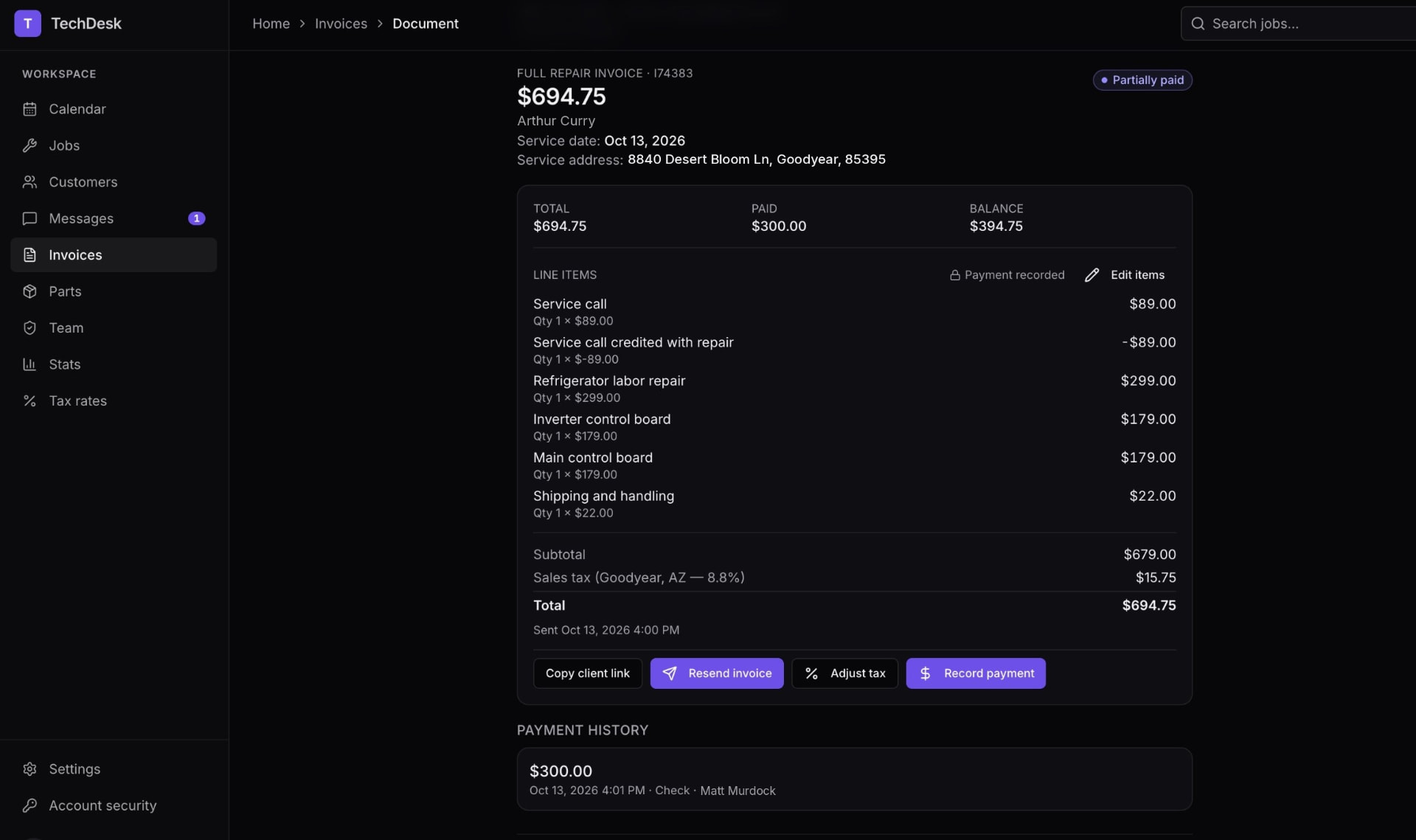
Record partial and full payments
Payments can be recorded as partial or full, along with the method used. A check is one example of a payment method. Recording a partial payment means you do not have to describe every payment as if the entire invoice had been paid at once.
The distinction is between the invoice and the payment record. The invoice describes what was billed; the recorded payment describes what was paid and how. That separation lets the office record the payment that actually happened, whether it covers part of the invoice or the full amount.
Voiding and job-linked details
Invoices can be voided. Voiding is available alongside the ability to record payments; it is not presented here as deleting a customer's job or changing the numbering scheme. Details of any additional voiding procedure need confirmation rather than assumptions about accounting behavior.
Automatic sales tax appears on the invoice, with the rate shown. Parts sold prices can link to the job's invoice as well. The related sales tax and parts tracking pages explain those features separately, so invoice viewing, recorded payments, tax and parts are not confused with an online payment service.
Frequently asked questions
- Can customers pay online from the invoice link?
- Online payment is not offered as a feature here. Customers view the invoice from a link, and the office records partial or full payments and their method.
- Can I record a check or a partial payment?
- Yes. You can record partial and full payments and the payment method, such as a check. The payment record is separate from viewing the invoice.
- Are invoice numbers connected to jobs?
- Yes. Invoice numbering is tied to the job number. Invoices also support voiding.