// FEATURE · PRO
Parts sales tax report
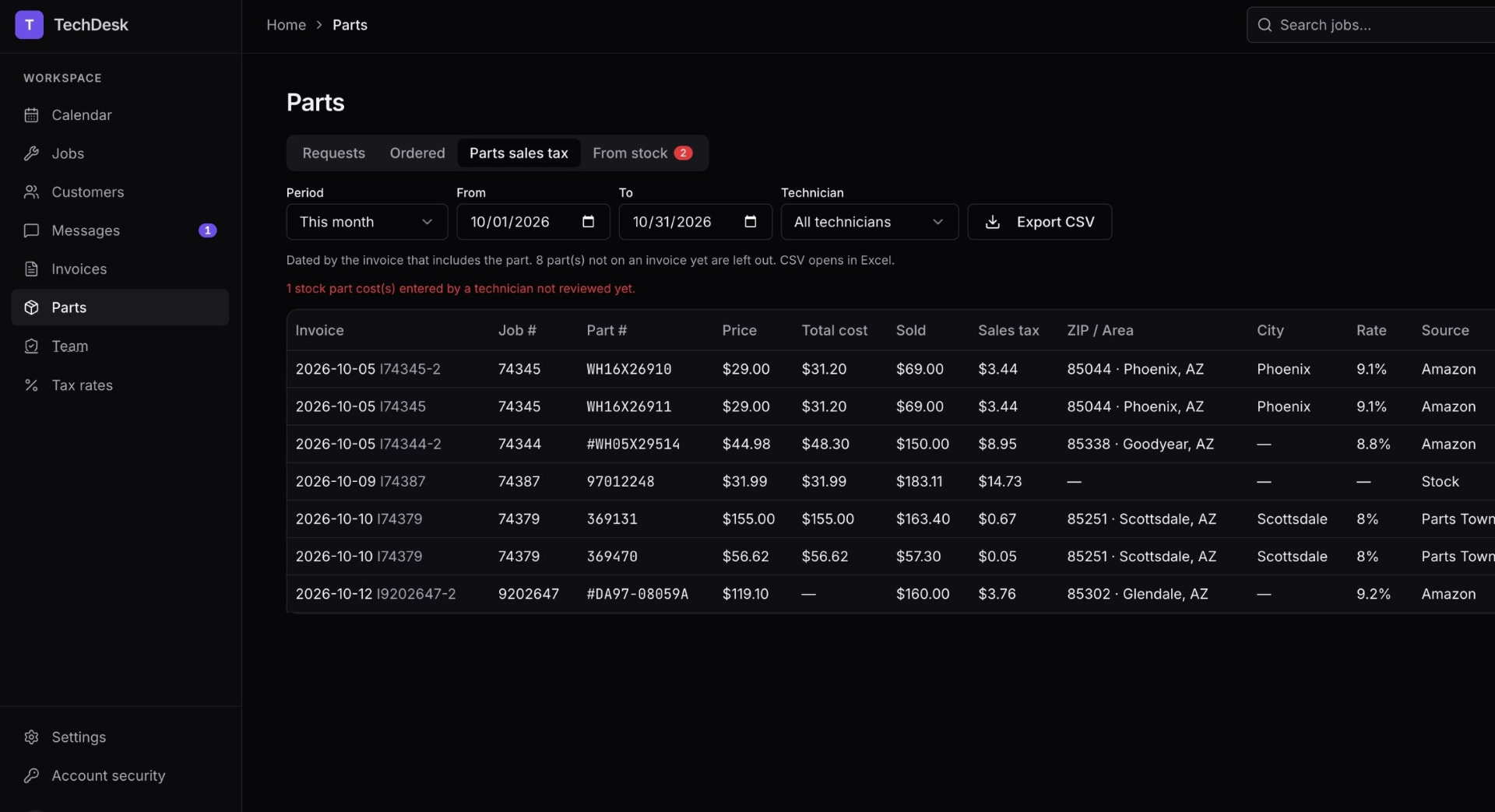
The BuiltCRM Pro parts sales tax report lists parts sold, dated by invoice, with ZIP, city, rate and sales tax. It exports to CSV for quarterly filing.
Parts sold, dated by invoice
The report concerns parts sold, not a general inventory list. Its date reference is the invoice, which matters when reviewing the sales included in the report. A part's reporting date is described here in terms of that invoice rather than its request or ordering date.
That distinction separates the report from parts tracking. Parts tracking covers a technician's request, the parts manager's notification, vendor information and the sold price linked to an estimate or invoice. The report focuses on the sold parts and their sales tax details.
Location, rate and sales tax
Each report includes ZIP, city, rate and sales tax. These are the confirmed location and tax details for parts sold. They belong together when reviewing the tax associated with those sales, instead of presenting the amount without its location and rate.
Automatic sales tax is calculated by ZIP, city and county, with regions set by an admin and the rate shown on the invoice. The report brings the listed parts tax details into a reporting view; it should not be confused with configuring tax regions.
CSV for quarterly filing
The report can be exported to CSV for quarterly filing. Exporting provides the report in a file format for that purpose. It does not claim that BuiltCRM submits a tax return, pays tax or replaces any filing requirements that apply to your business.
This is a Pro feature. It is separate from the standard parts workflow and the automatic invoice tax calculation. When comparing the two, look at the task you need: tracking what to order is the parts workflow, showing the rate on an invoice is the tax calculation, and reviewing parts sold with invoice dates and CSV output is the Pro report.
Frequently asked questions
- Which package has the parts tax report?
- The parts sales tax report is a Pro feature. It lists parts sold with the invoice date, ZIP, city, rate and sales tax.
- Which date is used for parts sold?
- Parts sold are dated by invoice. The report is not described as being dated by the part request or vendor order.
- Does the report file taxes for me?
- The confirmed feature is CSV export for quarterly filing. Automatic filing or tax payment is not specified.